Black specks are one of the most
frustrating defects to chase on a molding floor. When they show up, the first
question is always the same: which resin lot did this come from? If the answer
is a guess, a plant-wide scramble follows. If you keep a batch record, you can
answer in minutes. This guide shows how to track polymer batches from the day a
lot arrives to the day a finished batch ships. It also explains TDS vs COA and
includes a template.
What Is Polymer Batch Traceability?
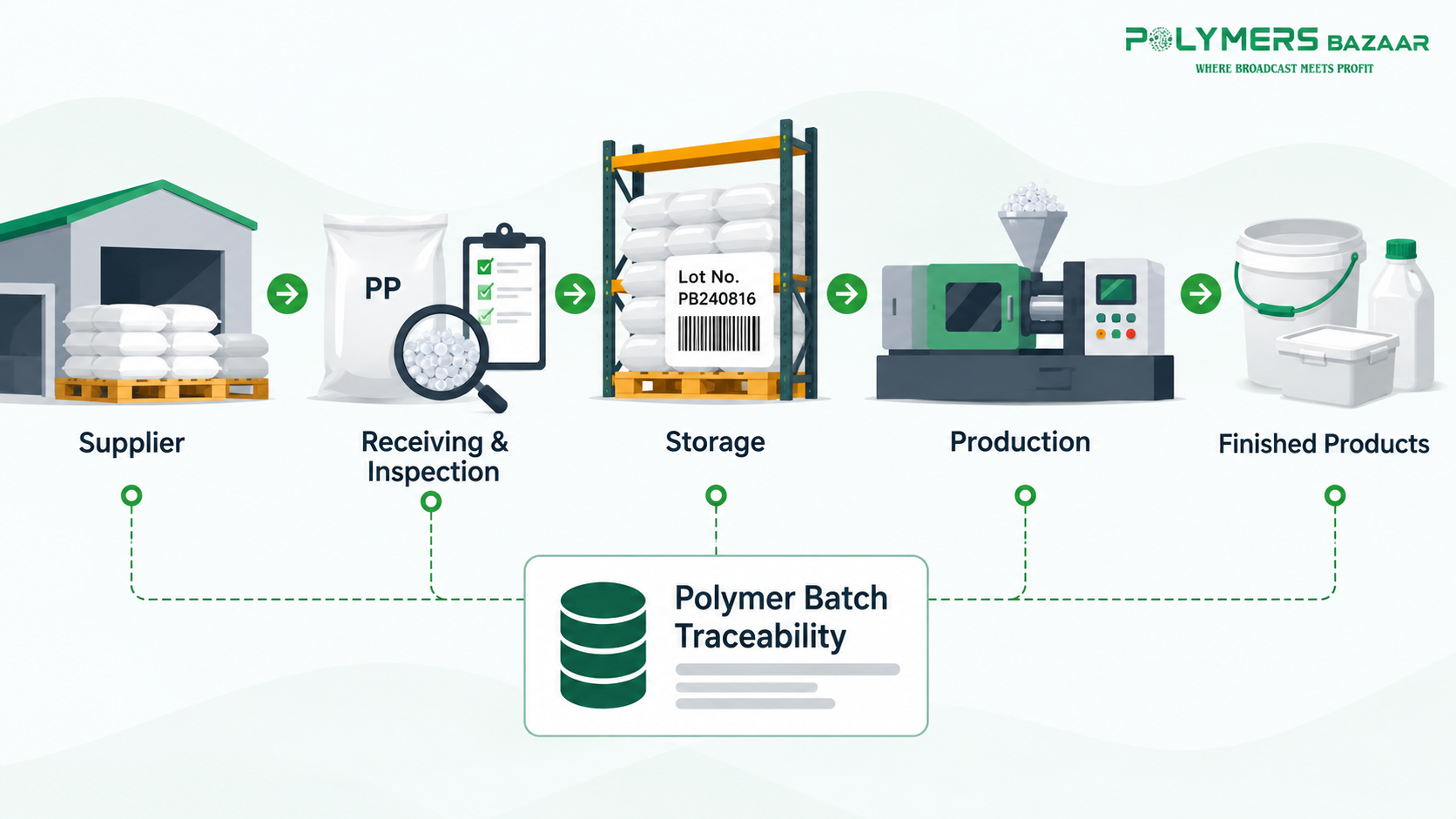
Polymer batch traceability is the ability
to follow each resin lot from delivery through storage and production into
finished goods, and back again. In practice, it means every bag or container
has a lot number, and that number is written next to the production batches
that used it.
TDS vs COA: Grade-Level Specifications vs Batch-Specific Test
Results
These two documents are often mixed up,
and the mix-up weakens traceability.
A technical data sheet (TDS) describes a
grade in general. It shows typical or nominal values, so it carries no lot
number. Reading it well matters, so see how to interpret a polymer technical data sheet
and record the specifications that matter to your process.
A certificate of analysis (COA) is issued
for one production lot. It typically lists the lot number, specification
limits, test methods and the measured results for that lot.
|
|
TDS |
COA |
|
Covers |
The grade in general |
One specific lot |
|
Values |
Typical or nominal |
Measured results |
|
Lot number |
No |
Yes |
|
Use in tracking |
Reference for specifications |
Evidence for each delivery |
Keep both. The TDS tells you what the
grade should do. The COA tells you what this lot actually tested at.
A Six-Step Traceability Workflow
1. Receiving
Log the supplier, grade, lot number,
quantity and delivery date when the material arrives. Match the lot number on
the bag to the delivery paperwork and the COA. Keeping delivery records and
supplier documents also makes it easier to identify red flags when choosing a polymer supplier,
such as missing or mismatched documents.
2. Inspection
Check packaging, labels and the material
itself before accepting the lot, and compare the COA values against your
specification. For a practical checklist, see how to inspect polymer quality before accepting a batch.
Record the result as accepted, on hold or rejected.
3. Storage
Write the storage location next to the
lot number. Keep different lots of the same grade clearly separated, and use
older lots first so stock does not sit for long.
4. Production Consumption
When a lot goes to the line, record the
production batch number against it. If one lot feeds several batches, add a
record for each use.
5. Finished-Product Batch
Give each finished batch a number that
points back to the production batch, and so back to the resin lot. This is the
link most plants skip.
6. Complaint Investigation
When a customer reports a defect, start
from the finished batch, move back to the production batch, then to the resin
lot and its COA. Compare the COA with your inspection record, then check
whether other batches used the same lot.
Batch-Tracking Template
A simple spreadsheet is enough to start.
We have prepared a template with these fields:
|
Field |
What
to record |
|
Supplier |
Who delivered the lot |
|
Polymer grade |
The grade as ordered |
|
Lot number |
The number on the bag and the COA |
|
COA |
Reference and whether it was received |
|
Delivery date |
The day the lot arrived |
|
Inspection status |
Pending, accepted, on hold or rejected |
|
Storage location |
Rack, bay or warehouse |
|
Production batch |
Each batch that used the lot |
Practical Example: Tracing Black Specks to a Raw-Material Lot
A molder finds black specks in a run of
blow-molded containers. The team opens the batch record. The finished batch
points to production batch PB-1018, and PB-1018 points to resin lot LOT-2026-0412.
The same lot was also used in PB-1020, so that batch is put on hold before it
ships.
The team then checks the lot's inspection
record and COA. The inspection notes show a damaged bag at receiving. The
record does not prove the bag caused the specks, but it tells the team where to
look first and which lots to isolate. Without the record, the same
investigation could have meant sorting through every lot in the warehouse.
Common Mistakes
●
Recording the grade but not the
lot. A grade name does not identify a delivery.
●
Filing the COA and never
matching it. Check that the lot number on the COA
matches the bag.
●
Skipping the production link. Without it, a lot cannot be traced to a finished batch.
●
Relying on the TDS as proof. It shows typical values, not what your lot tested at.
Key Takeaways
●
Give every lot a number and write
it down at receiving.
●
Use the TDS for specifications and
the COA for lot evidence.
●
Link each lot to production
batches and finished batches.
●
Keep inspection and storage
records beside the lot number.
Conclusion
Batch tracking does not need special
software. It needs a lot number, a few fields and the habit of filling them in.
Once that is in place, a defect becomes a search with a starting point instead
of a guess. Start with the template and add detail as your process needs it.
FAQs
What is polymer batch traceability?
It is the ability to follow a resin lot
from delivery to the finished goods that used it.
What is the difference between a TDS and
a COA?
A TDS shows typical values for a grade,
while a COA shows test results for one lot.
What should a batch record include?
Supplier, grade, lot number, COA,
delivery date, inspection status, storage location and production batch.
Do I need software to track batches?
No, a spreadsheet works well for most
small and mid-sized plants.
How do I trace a defect back to a
resin lot?
Start from the finished batch, then
follow the record to the production batch and the resin lot.